Claude Code Settings: All 46 /config Options, Tested
Claude Code's /config screen has 46 options. About half are about how the terminal looks. Eight change what it costs and what Claude does while you're not watching. I tested the ones that surprised me.

Table of Contents8 sections
Real tests on Claude and SEO tools, with the numbers and what failed. About once a week.
Almost there. Check your inbox and click the link to confirm. Not there in a minute? Look in spam.
Something went wrong on my side. Try again in a minute.
Too many tries. Give it a minute.
That email doesn't look right. Check it for a typo.
Unsubscribe anytime. Privacy

On 24 October I typed /config in Claude Code to change one thing. The list ran off the bottom of the screen, and I didn't know what half of it did.
So I went through all 46 options in Claude Code 2.1.311.
The short version: about half of the 46 change how the terminal looks or feels. Eight change what you pay, or what Claude does while you're away.
I checked each against Anthropic's docs and tested the odd ones.
And one, Thinking mode, does nothing at all on Opus 5.5.
Short on time? Jump to the eight that matter, or look one up in the full table.
Key Takeaways
- Eight options change cost or unattended work: auto-compact, continue at usage limit, permission mode, auto mode during plan, workflows, Chrome, Remote Control and the question timeout.
- Thinking mode can't be switched off on Opus 5.5. I tried from the command line and Claude Code refused.
/config key=valueworks without opening the menu, but not for every setting.- Some values are per folder. The same option showed true in one project and false in another.
- A project file can't put you in auto or bypass mode. The menu showed Bypass, and the session still started in manual mode.
How to open it, and where it saves
Type /config in a Claude Code session and open the Config tab, the third of five: Settings, Status, Config, Usage and Stats.
Arrow down, Enter or Space to change a row, Esc to close.
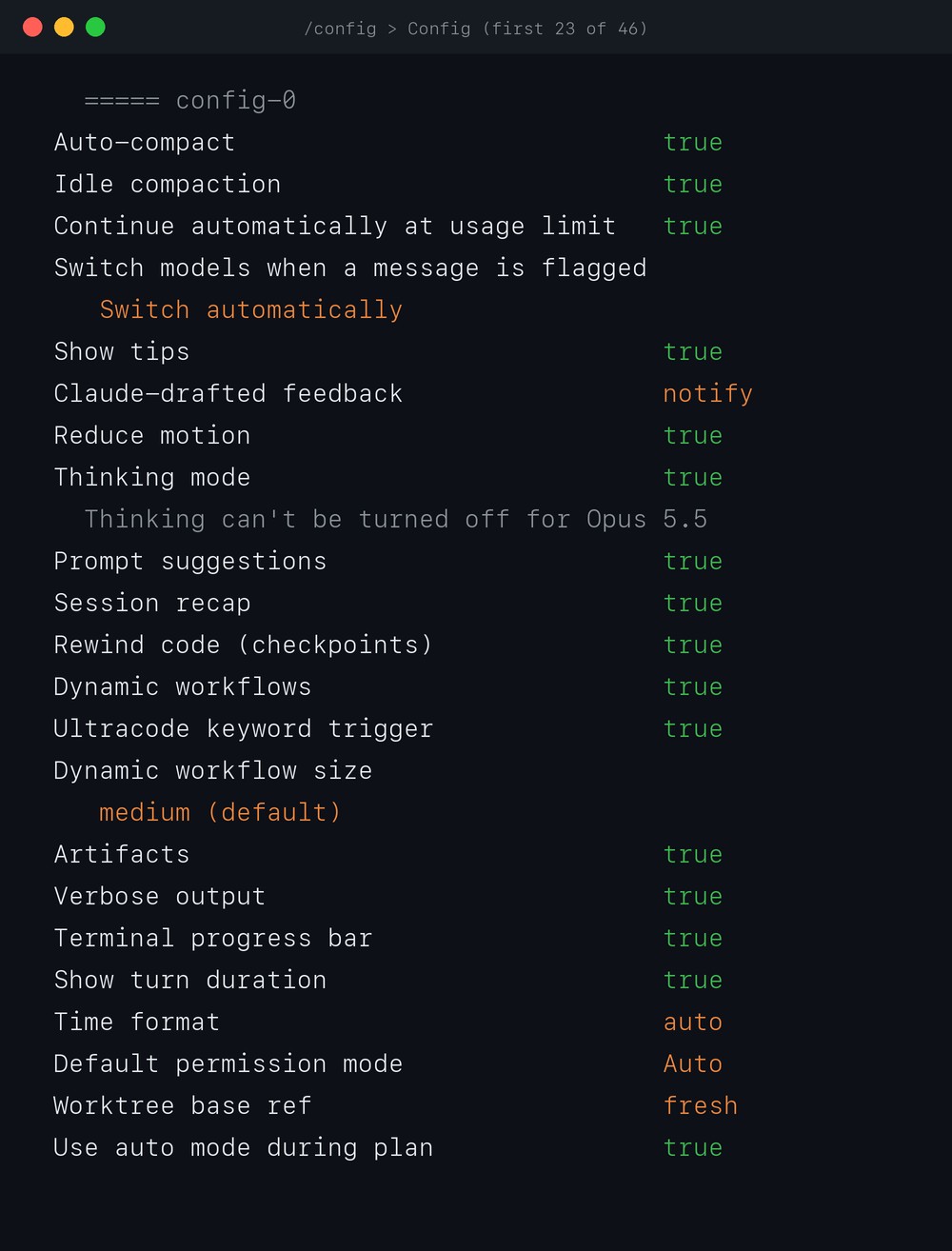
Changing a row writes a file for you. Which file depends on the option, and it matters when a value seems to ignore you:
| File | What lands there | Examples from the list |
|---|---|---|
~/.claude/settings.json | Most options, for every project | Auto-compact, Editor mode, Default permission mode |
~/.claude.json | Options Claude Code calls global config | Copy on select, Workflow size, Claude in Chrome |
.claude/settings.local.json | A few options, only for the folder you're in | Output style; Reduce motion landed here for me |
Anthropic's settings page has the full order of which file wins.
You can also skip the menu. Pass key=value and Claude Code saves it straight away, even from a script:
$ claude -p "/config verbose=true"
Set Verbose output to true
$ claude -p "/config alwaysThinkingEnabled=false"
alwaysThinkingEnabled isn't a /config setting. Run /config to see what's available.
It took about 4 seconds. It takes the menu's own option names, and refuses a few changes on purpose, like the one below.
The eight that matter
These are the ones I'd read before touching anything else. Each one changes what you pay or what happens when you aren't looking.
| Option | Default | Mine | What it really does |
|---|---|---|---|
| Auto-compact | on | on | Summarises the chat near the context limit. Turn it off and idle compaction goes off too |
| Continue automatically at usage limit | on | on | When a claude.ai plan limit stops an open session, waits for the reset and carries on by itself |
| Default permission mode | depends on where you run it | Auto | Which mode a new session starts in, from asking every time to approving everything |
| Use auto mode during plan | on | on | In plan mode, a classifier can approve shell commands without asking you |
| Dynamic workflows and Ultracode trigger | on | on | Lets Claude run many agents at once; typing "ultracode" starts one |
| Claude in Chrome enabled by default | off | on | Every interactive session starts with the browser tools loaded |
| Enable Remote Control for all sessions | off | on | Every interactive session can be driven from the Claude app on your phone |
| Question auto-continue timeout | never | never | After 60 seconds to 10 minutes, an unanswered question goes ahead with whatever you'd ticked |
Continue at usage limit is the one to know about. Anthropic's docs say the setting "grants unattended execution". That's why the shortcut refuses to switch it on:
$ claude -p "/config autoContinueAtUsageLimit=true"
Continue automatically at usage limit can't be enabled with key=value
open /config to change it from the panel.
I keep it on, because I leave long jobs running while I'm out.
Dynamic workflows cost more than they look. One run "can use meaningfully more tokens" than the same task in a normal chat, the docs say.
And the size option next to it is only "advice, not an enforced cap".
Chrome by default has a price too: it "increases context usage", because the browser tools always load. Mine stays on. I read Keyword Planner in the browser for most posts, like this Semrush comparison.
Remote Control is how I follow a long session from my phone. It only connects your own account. Both push options need it.
What I found when I tested them
Thinking mode shows "true", and you can't change it on Opus 5.5. The row has a note under it, and the shortcut says the same:
$ claude -p "/config thinking=false"
Couldn't save Thinking mode: Thinking can't be turned off for Opus 5.5
Anthropic's own cost page still suggests "disabling thinking in /config" to spend less. On Opus 5.5, Sonnet 5.5 and Haiku 5.5, it does nothing.
Use /effort for that.
Some values are per folder. Reduce motion read true in saeedseo.com and false in mersa.biz, same Mac, same day.
The permission row can show a mode you aren't in. In mersa.biz the menu read "Bypass Permissions", from the project file. The footer said "manual mode on".
The documented rule: auto and bypass only take effect from your own user settings, never a project file.
Why it fell back to manual and not to my Auto, the docs don't say. I don't know either.
One more trap: Rewind code doesn't track files that only Bash changed. A file Claude already edited is covered, even if Bash touches it later.
All 46 options
Here's every row on the Config tab in 2.1.311, top to bottom, as a normal terminal shows it, with my value and the default:
| # | Option | Mine | Default | What it does |
|---|---|---|---|---|
| 1 | Auto-compact | true | true | Summarises the conversation when context gets close to the limit |
| 2 | Idle compaction | true | true | Compacts a long chat you've left idle for about an hour |
| 3 | Continue automatically at usage limit | true | true | Carries on with the task once a plan limit resets |
| 4 | Switch models when a message is flagged | Switch automatically | Switch automatically | Moves to a fallback model when a safety check flags a request, or asks you first |
| 5 | Show tips | true | true | Feature tips in the spinner line |
| 6 | Claude-drafted feedback | notify | notify | Claude can queue bug reports about Claude Code for you to review; shows only where the feature is on |
| 7 | Reduce motion | true | false | Turns off the spinner, shimmer and flash effects |
| 8 | Thinking mode | true | true | Extended thinking; locked on for Opus 5.5 |
| 9 | Prompt suggestions | true | true | Grey guesses of your next prompt (each counts toward your usage) |
| 10 | Session recap | true | true | A one-line recap when you come back after a few minutes |
| 11 | Rewind code (checkpoints) | true | true | Snapshots files before each edit so /rewind can undo it |
| 12 | Dynamic workflows | true | on (off on Pro) | Lets Claude run many agents from one script |
| 13 | Ultracode keyword trigger | true | true | Typing "ultracode" in a prompt starts a workflow |
| 14 | Dynamic workflow size | medium | medium (small on Pro) | Agents per workflow: small under 5, medium under 10, large under 50 |
| 15 | Artifacts | true | your account's setting | Lets Claude publish output as a private web page on claude.ai |
| 16 | Verbose output | false | false | Shows every tool call's full input and output |
| 17 | Terminal progress bar | true | true | A busy indicator on the tab, in iTerm2, Ghostty and ConEmu |
| 18 | Show turn duration | true | true | The "Cooked for 1m 6s" line after each answer |
| 19 | Time format | auto | auto | 12-hour, 24-hour or UTC |
| 20 | Default permission mode | Auto | depends on where you run it | The mode new sessions start in |
| 21 | Worktree base ref | fresh | fresh | New worktrees branch from the remote's main, or from your local HEAD |
| 22 | Use auto mode during plan | true | true | Auto-approves shell commands while planning |
| 23 | Respect .gitignore in file picker | true | true | Leaves ignored files out of the @ picker |
| 24 | Skip the /copy picker | false | false | /copy takes the whole answer without asking which block |
| 25 | Copy on select | false | true | Copies text as soon as you select it (fullscreen mode) |
| 26 | Auto-scroll | true | true | Follows new output to the bottom (fullscreen mode) |
| 27 | Open agents view by default | false | false | claude with no arguments opens agent view |
| 28 | ← opens agents | true | true | Left arrow on an empty prompt opens agent view |
| 29 | Auto-update channel | latest | latest | latest, or stable (about a week behind) |
| 30 | Theme | Auto (match terminal) | dark | Colours; auto follows your terminal |
| 31 | Local notifications | Terminal Bell | auto | How it alerts you on this computer |
| 32 | Push when actions required | true | false | Phone alert when a prompt waits (needs Remote Control) |
| 33 | Push when Claude decides | true | false | Phone alert when Claude thinks it's worth one, like a long task ending |
| 34 | Output style | default | default | Changes tone and format, such as Explanatory or Learning |
| 35 | Language | Default (English) | English | The language Claude answers in (not in the docs as a menu row) |
| 36 | Editor mode | vim | normal | Vim keys in the prompt box |
| 37 | Question auto-continue timeout | never | never | Lets an unanswered question go ahead after a set time |
| 38 | Show last response in external editor | false | false | Ctrl+G opens your editor with Claude's last answer as comments |
| 39 | Show PR status footer | true | true | The open pull request's badge in the footer |
| 40 | Model | Default (recommended) | your account's default | The model new sessions start with |
| 41 | Auto-connect to IDE (external terminal) | false | false | Joins a running VS Code or JetBrains on start |
| 42 | Claude in Chrome enabled by default | true | false | Browser tools in every session |
| 43 | Enable Remote Control for all sessions | true | off | Every session reachable from the Claude app |
| 44 | Dialog expiry | default | 5 minutes | How long a dialog sent to your phone waits |
| 45 | Messages from your other sessions | default | decides per message | Accept, hold or refuse messages from your other sessions |
| 46 | Project instructions | claude-md-or-agents-md | claude-md-or-agents-md | Reads CLAUDE.md, or AGENTS.md when there's no CLAUDE.md |
Each row's key and file is in Anthropic's settings reference.
Two rows aren't in the docs as menu rows: Language, and Worktree base ref. I matched that one to its key through my own settings.json.
The other four tabs
/status opens the same screen on the Status tab: version, model, account, and every settings file loaded. Which file set which value, it doesn't say.
Usage is /usage: plan limits, session cost and activity. On a subscription, the cost figure isn't your bill, the docs say. Stats is where /stats lands, and Settings is the first tab.
What I'd change first
- Check Default permission mode in
~/.claude/settings.json. It decides how often you get asked, though an ask rule on an MCP tool still prompts in auto mode. - Decide on Continue at usage limit before you leave a long job running.
- Turn off Claude in Chrome by default if you don't use the browser most days. It costs context in every session.
- Leave Rewind code on, and still commit before anything risky. Files only Bash touched aren't in it.
- Skip Thinking mode on Opus 5.5. Use
/effortinstead.
Once it's set up, test it on a job you already know the answer to, like my Claude Code vs Codex run on five SEO jobs.
Common Questions
Where does Claude Code save the settings I change in /config?
Mostly in ~/.claude/settings.json, for every project. Options Claude Code calls global config, such as Copy on select, go to ~/.claude.json, and a few, such as Output style, go to the project's .claude/settings.local.json.
Can I change a Claude Code setting without opening the /config menu?
Yes. Type /config verbose=true, or run claude -p "/config verbose=true" from a script. It saved in about 4 seconds in my test, but Claude Code refuses settings that would let it run unattended.
Can I turn off thinking in Claude Code to save money on Opus 5.5?
No. Claude Code 2.1.311 answered "Thinking can't be turned off for Opus 5.5". On Opus 5.5, Sonnet 5.5 and Haiku 5.5, lower the effort level with /effort instead.
Why does my Claude Code permission mode not match what /config shows?
A project's settings file can't start a session in auto or bypass mode. In my mersa.biz folder, /config showed Bypass Permissions while the session ran in manual mode. Set those two modes in ~/.claude/settings.json.
I run real tests on Claude and SEO tools, like 10 voice models on one Mac or 25 audits of a site with 20 planted problems. You get the numbers, including what failed. One email per post, about once a week.
Almost there. Check your inbox and click the link to confirm. Not there in a minute? Look in spam.
Something went wrong on my side. Try again in a minute.
Too many tries. Give it a minute.
That email doesn't look right. Check it for a typo.
Unsubscribe anytime. Privacy